Frequently Asked Questions and Answers (Shaker Touch 2)
Question: What are the electrical characteristics of the machine?
Answer: Voltage: 230V +5V/-10V; consumption - 50W in standby mode, up to 200W peak load when drink preparing. The average monthly energy consumption is 46 kW.
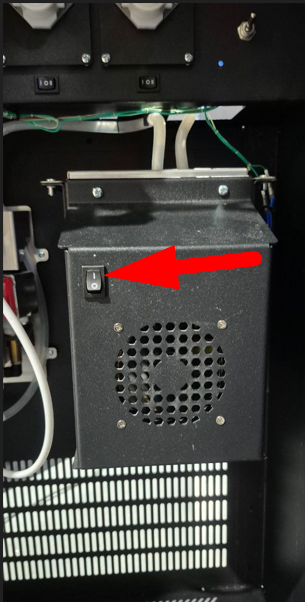
Question: How do I turn on the cooler of the vending machine?
Answer: Switcher it is located on the cooler unit inside the machine.
Question: How efficient is the cooler? What is the outlet temperature of the drink?
Answer: Standard cooler: after reaching the maximum cooling capacity (15-20 minutes after turning on the cooler), the temperature of the drink is about 16 degrees. Compressor cooler: the temperature is controlled by user settings.
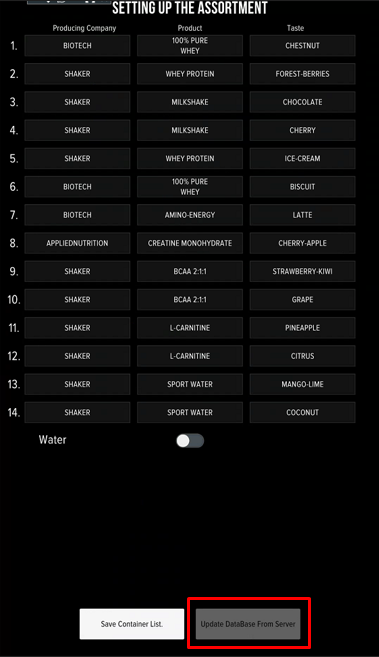
Question: There is no desired brand (taste) in the machine settings. How do I add it?
Answer: If the machine is connected to telemetry, press the button on the flavor setup screen "Update database from server", then check the list. If the required product is missing, leave a request to add it to technical support.
Question: What are the recommendations for drink dosages?
Answer: Follow the manufacturer's recommendations (usually indicated on the packaging). You can change the dosages at your discretion to achieve the best taste of the drinks - if there are no ingredients in the composition that strictly limit the daily dosage (for example, caffeine). You can use 220ml of water and 30g of powder as the base for setting up protein drinks. Calibrate the powders and water, prepare and taste the drink. To achieve a better taste, change the dosage - add a little product (in 5g increments) or reduce the dosage of water (in 10ml increments).
Question: How do I turn on a small volume of a drink?
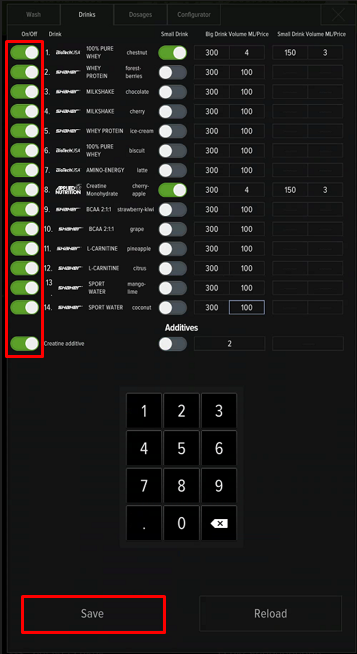
Answer: Activate it option in the service menu, then set price and volume.
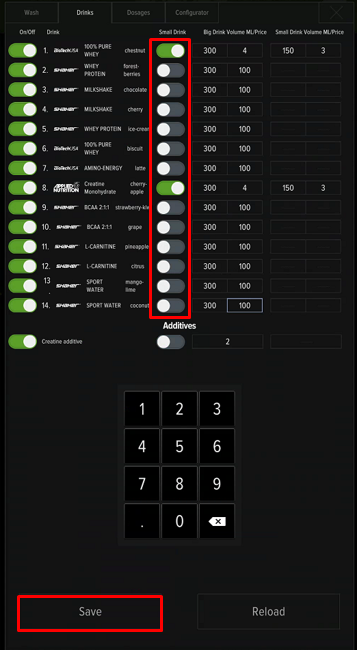
Question: How do I remove a drink from the selection?
Answer: Turn off in the service menu.
Question: How do I use discount promo codes and QR codes?
Answer: A telemetry connection is required for the promo code system to work.
Question: Is it possible to use ads on the screen?
Answer: Requirements for advertising materials:
- For images: PNG and JPEG/JPG formats with 1080×1920 resolution (9:16)
- For videos: WEBM format with VP8 codec with 1080×1920 resolution (9:16).
The line «TAP ON THE SCREEN» will be constantly displayed at the bottom of the screen. Its height is 150 pixels. When preparing materials, keep in mind that it may overlap some advertising elements. Please send the materials to e-mail support@shaker.su with the serial number of the machine.
Question: How often do I need to service the machine?
Answer: It is recommended to perform maintenance at least 2 times a week. In fact, everything will depend on the frequency of use of the machine.
Question: Is it possible to remotely monitor the device?
Answer: For these purposes, we use our own telemetry and various remote access programs. Contact with technical suuport for detailes.
Question: Is it possible to simultaneously supply powders from two containers for mixing flavors?
Answer: There is an option to add creatine to any drink from the assortment. To use this option, you need to add creatine to the list of drinks (product lines containing creatine usually have the word CREATIN in the name), calibrate the supply, enable the «Supplement» option on the «Drinks» tab of the service menu, set the price and dosage of the supplement. When the option is enabled, a message will appear on the machine screen before payment with a suggestion to add creatine to the drink.
Question: When flushing the mixer, water enters one mixer and not the other.
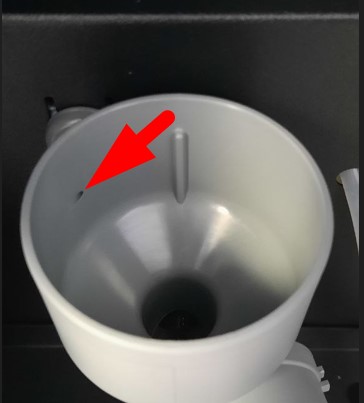
Answer: Remove the mixer funnel, clean water hole.
Question: Drinks disappear from the screen. They appear after a reboot, but disappear immediately.
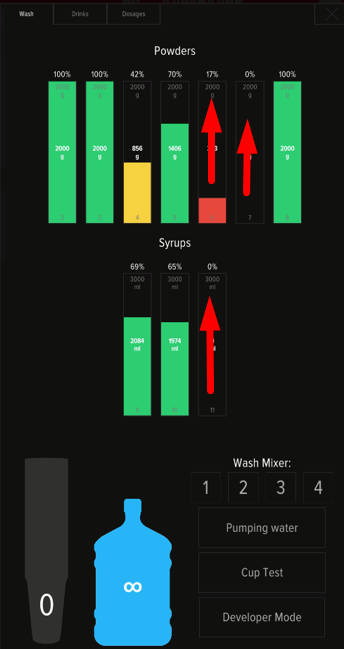
Answer: Check the remains in service menu. When the remaining product values are low (less than 5 servings), the machine hides the drink from the selection.
Question: Mixers are often clogged with powder. Why is this happening?
Answer: There may be several reasons:
- Incorrect assembly of mixer components - check out the mixer assembly/disassembly video;
- Poor cleaning of mixers, filling hoses and fittings;
- Incorrectly selected dosages of the drink (too much powder and not enough water);
- Insufficient water pressure in the system (checking the water level);
- Poor powder quality - loss of flowability (lumps form), dampness due to improper storage, absence of anti-tracking agents. The presence of solid particles, crumbs, and pieces of dried fruit in powders can also lead to frequent blockages, even with regular maintenance.
Question: After switching on, there is no image on the screen, the message «No signal» lights up.
Answer: Press ON/OFF.
Question: The machine is turned on, there is no image, the screen is black, but when you touch it, you can hear the drinks flipping through.
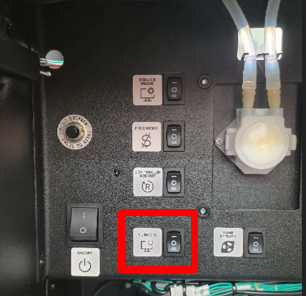
Answer: There was a power failure of the machine - the power was switched to the UPS built-in battery. In this case, the PC and the touch screen module are working, and the rest of the equipment may be de-energized. To restore operation, turn off the main power toggle switch and turn it on again.
Question: The machine restarts immediately after the start of cooking. What to do?
Answer: Disassemble and rinse the mixer components, check the correct assembly of the parts. When the motor is jammed (for example, the impeller is incorrectly installed), the machine goes into reboot with a power reset.
Question: When cooking, there is a knock and a loud creak. The drink is prepared very watery.
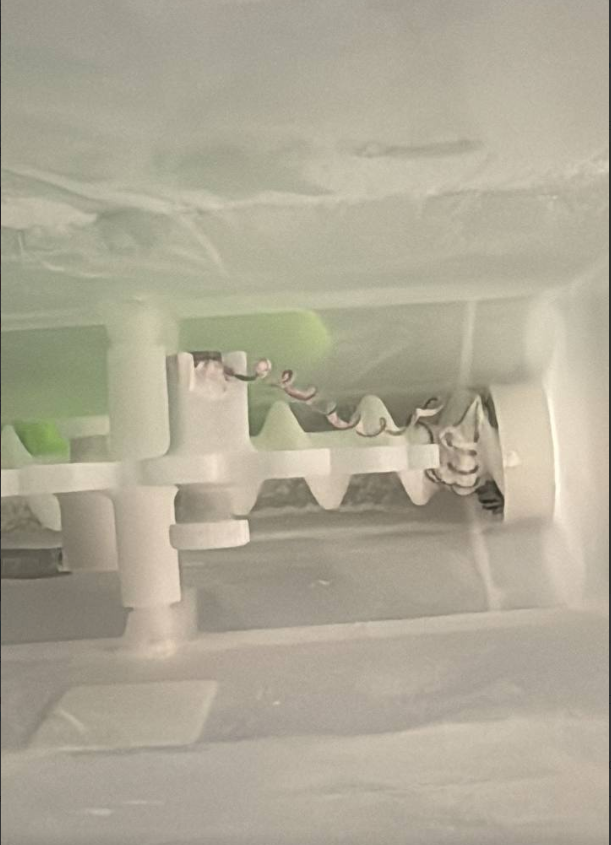
Answer: Remove the container of this drink, pour out the powder and check the mixing springs inside the hopper. In some cases the spring is tightened under the powder feed screw, remove it (installing another one is not necessary, the presence of one spring is enough to prevent the powder from caking). Check that the container is being assembled correctly.